


No products in the cart.

LEED Exam Formats and Procedures
About the LEED Exam
The U.S. Green Building Council (USGBC), who created the LEED standards and exam, relies on a network of education partners to prepare candidates for the LEED exam.
Everblue is the largest USGBC Education Partner with students reporting a 99% first-time pass rate.
We'll teach you everything you need to know to pass.

LEED EXAM TOPICS
What Does the LEED Exam Cover?
The LEED Green Associate Exam pulls content from all of the LEED rating systems.
The LEED AP Specialty Exams focus on their respective LEED rating system.
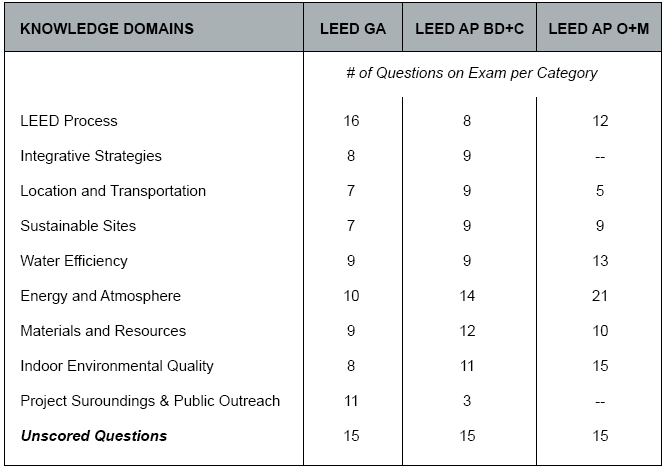
The exam content is organized into "Knowledge Domains" (see below). Notice how the topic focus shifts depending on which exam you take (left).
- LEED Process
- Integrative Strategies
- Location and Transportation
- Sustainable Sites
- Water Efficiency
- Energy and Atmosphere
- Materials and Resources
- Indoor Environmental Quality
- Project Surroundings & Public Outreach
LEED Exam Scoring
How are the LEED Exams Scored?
The questions are all weighted differently, so there is no target number for how many questions to get correct.
The USGBC has a pool of 1000+ questions that they can pull from to make the exams, so no two exams will look the same.
The USGBC does not share its database of questions with anyone.
LEED EXAM SCHEDULE
When Can I Schedule my LEED Exam?
The LEED exams are offered Monday - Saturday from 8 AM - 8 PM.
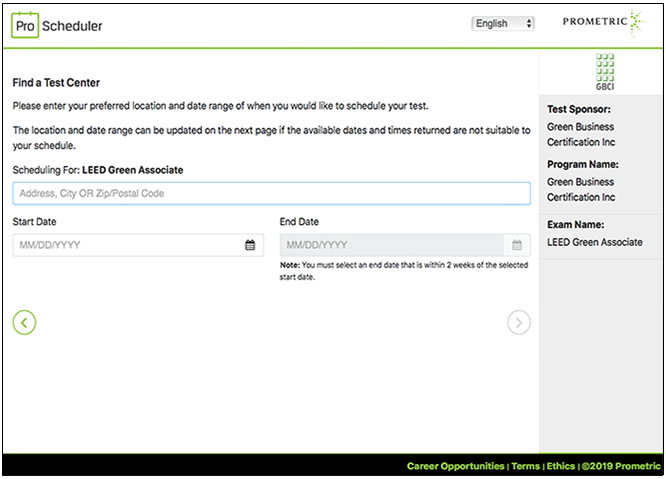
You'll be able to choose the exact date and time of your exam appointment.
Registering for your LEED exam is a 2-step process:
- First, create a USGBC account and purchase your exam from them.
- Then, find a local Prometric test center and choose a test session.
Prometric has locations in nearly every major city in the world, so you shouldn't have any trouble finding one within driving distance.
We provide detailed instructions on how to register for your LEED exam during our course. Sign Up Now!
LEED Exam Registration
Important LEED Exam Deadlines
Make sure that you have the time to prepare for your LEED exam.
And know these USGBC rules on taking your exam.
LEED EXAM PRICING
How Much Does the LEED Exam Cost?
The USGBC offers a variety of price levels for its LEED exams.
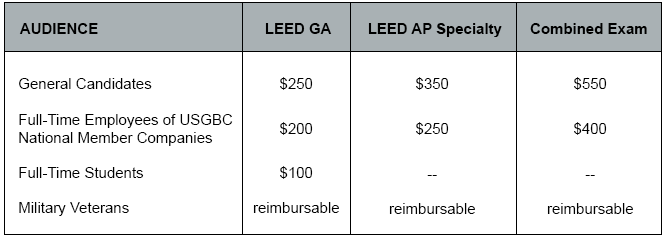
LEED GA/AP Exam
What is the Combined Exam?
The Combined Exam is the LEED Green Associate exam immediately followed by the LEED AP Specialty exam (no breaks).
It's a fast-track to LEED AP, but you have to pass both parts to earn the LEED AP credential.

Pros
- Save $50 ($550 instead of $600 for Green Associate and AP separately)
- Jumps you up to the LEED AP level in one quick step
Cons
- Must pass both parts, or else you walk away empty-handed
- 4-hour test can be overwhelming and exhausting
LEED EXAM PREP
How Do I Prepare for the LEED Exam?
That's where we come in!
At Everblue, we offer LEED Exam Prep classes to ensure that you earn your LEED credential without a problem.
Start today with the LEED Green Associate Exam Prep training and take advantage of our Pass Guarantee!